

The New Business Narrative: Instagram and Facebook Stories
Instagram and Facebook Stories are the secret ingredients in making your social media content work for your business. Here's why and how to get started!
There’s no denying it, social media has taken the world by storm. Most businesses know that and have curated social media presences, creating strong competition for the eyes of customers. Your content could be quickly lost in the noise. All that creativity and hard work could go completely unnoticed.
So, what’s the secret sauce to make sure your audience notices your new, fantastic content?

Instagram and Facebook Stories are the secret ingredients in making your social media content work for you. Utilizing the Stories feature on both Instagram and Facebook is a great way to boost engagement, promote your latest product, and give your audience special “behind the scenes” extras.
" Instagram and Facebook Stories are the secret ingredients in making your social media content work for you "
Let’s back up, though.
What are Stories, and how do they work?
Instagram first launched the Stories feature in 2016. Currently, ONE BILLION Instagram users post using this feature every day. Stories appear at the top of the home page on both Instagram and Facebook. On Instagram, they look like a glowing circle around the profile image of the person who posted it. On Facebook, they look similar, but in addition have a preview of the story.
Stories are a terrific way to achieve maximum exposure to your followers because algorithms will never throttle them so that your audience doesn’t see them. However, all of this means nothing if you don’t know how to effectively and efficiently operate this free resource for advertising.
" Stories are a terrific way to achieve maximum exposure to your followers because algorithms will never throttle them so that your audience doesn’t see them "
How To Use Instagram and Facebook Stories
Using Stories on Facebook and Instagram is pretty straightforward. You can share a post you’ve already created, create an entirely new Story, or upload a recent photo from your camera roll. Instagram and Facebook offer several great tools to make your Stories eye-catching and interactive for your audience.
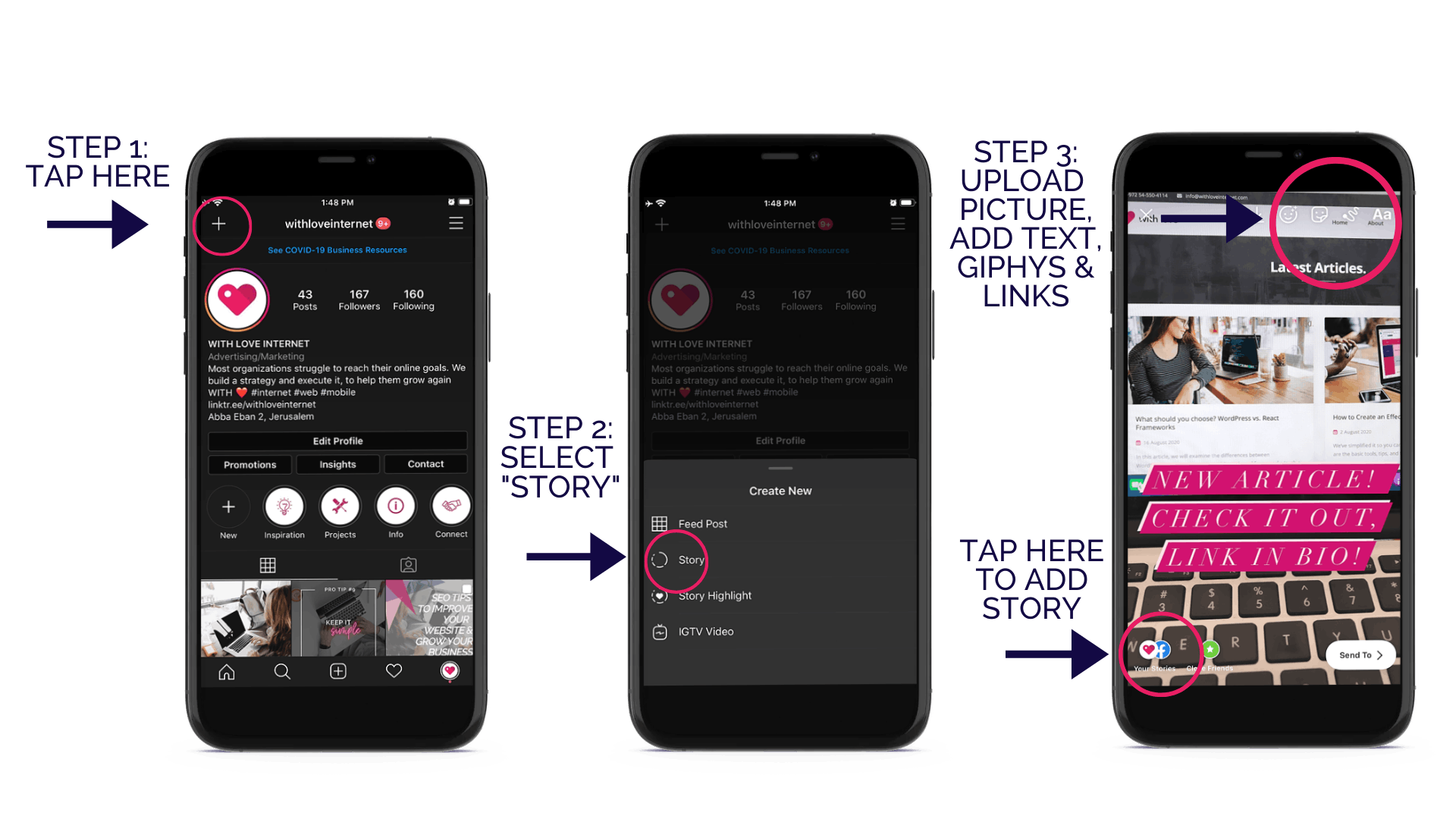
One thing to note is that Stories are only available to view for 24 hours. If you want to make sure your audience has access to a Story for longer, you will want to create a “Highlight,” where you file your stories. Highlights make your Stories available indefinitely.
When you create a Highlight for your Stories, you can add a title and cover image. Make these fun and creative, so that your audience can easily understand what the different Highlights are for.
" Pro Tip: Create Highlights and Highlight Covers to keep key Stories on your profile for longer "

Why Instagram and Facebook Stories are Effective
The top reason that Instagram and Facebook Stories are effective is that the algorithms never throttle them. Facebook and Instagram are notorious for their ever-changing and evolving algorithms, which make you seen either more or less frequently.
Posting Stories is the best way to make sure your audience sees that you have a new post. It means you can interact with them without worrying about the algorithms. If someone is following you on Instagram or Facebook, they will automatically see your profile picture and story at the top of their home page.
" Posting Stories is the best way to make sure your audience sees that you have a new post "
You can also utilize hashtags on Instagram, making sure your stories are seen by an even broader audience.
Need more details about hashtags and how to use them in posts effectively? We’ve got you covered! Check out our article here.
Three Common Mistakes To Avoid

- Tiny text – you want to make sure your audience can clearly see and understand the text on your stories. Make use of the different fonts and sizes.
- Text-heavy stories – don’t be wordy, get straight to the point, and don’t over clutter your story with text. Ain’t nobody got time to read an essay!
- Incorrect links – these can accidentally happen to anyone. That’s why Instagram and Facebook now let you preview the link you are including on a story. Trust us, and take the two extra seconds to double-check that link!
Fun and Creative Ways To Utilize Stories Today
Share your fantastic new post. This may seem like a no-brainer, but trust us, not all of your followers see your recent posts, so be sure to share your new post to your story with a fun Giphy, reaction, title, or question. Make it interactive, so they want to check out the full post.
Use those fun tools and stickers. Instagram and Facebook are always adding new filters, giphys, reactions, questions, etc. Use them! Add a question sticker to ask your audience’s opinions on your new post or product.
" Use those fun tools and stickers "
Get personal! A Story is meant to be a more organic, less formal space for your audience. Use them as a place for “behind the scenes” videos, in which you give your audience a preview or a peek behind the curtain.
Swipe up! If you have enough followers, Instagram and Facebook give you the ability to add outside links to your stories. Swipe-up links are a great way to take your audience to your new YouTube video, product page, or blog.
Now you’re ready to start using Stories to their full capacity. Get out there, and happy posting!
Do you need help creating a social media strategy? That’s where we come in. Our professional experts will help you launch your social media accounts, create an effective strategy, and teach you how to maintain it.
Please don’t hesitate to contact us.