

How to Create a Social Media Marketing Strategy (2026 Guide)
How to create a social media marketing strategy that grows your business, using our four-step cycle: plan, create, execute and improve. Includes Stories tips, tools and a review routine.
Posting on social media is easy. Getting results from it? That takes a strategy.
Meta’s apps alone reach an average of 3.64 billion people every day. Your audience is definitely there. The problem is that everyone else is there too, and nobody has patience for random, low-effort posts.
Some accounts blow up overnight, and it’s tempting to chalk it up to luck. But lasting growth isn’t luck. Rome wasn’t built in a day, and, boy, did those strategy-loving Romans know what they were talking about.

At WLI, we run every client’s social media through the same four-step cycle: Plan, Create, Execute, Improve. In this guide, I’ll walk you through each step so you can build a social media marketing strategy that actually grows your business.
What Is a Social Media Marketing Strategy?
A social media marketing strategy is your plan for using social media to reach specific business goals. It answers four questions:
- Who are we? Your brand, your message and the value you offer.
- Who are we talking to? Your audience and the platforms they use.
- What will we post, and when? Your content mix and posting schedule.
- How will we know it’s working? The numbers you track and how often you review them.
Without those answers, you’re just posting and hoping.
Step 1: Plan
Abraham Lincoln is often quoted as saying, “Give me six hours to chop down a tree and I will spend the first four sharpening the axe.” Social media is no different.
Define who you are
If you don’t know who you are, no one else will, either. People decide in seconds whether you’re worth following, so your message has to be clear at a glance. Ask yourself:
- Who are we, and what do we stand for?
- What value can we share freely with our audience?
- How does what we offer change our customers’ lives?
Then boil your answers down to one simple sentence and use it as your reference point for every post. We take most of our clients through our HeroGuide method to get this clarity before we plan a single post.
Know your audience
The most successful brands know exactly who they’re talking to. Nike speaks to anyone who loves sport with three words: “Just do it.” Get to know your audience:
- Check the analytics on each platform to see their age, gender and location.
- Ask them directly with polls, question stickers or a short survey.
- Look at which posts they comment on, save and share most.
Set clear goals and a budget
Decide what you want social media to do for you: build awareness, drive website traffic, generate leads or sell products. Then ask how you’ll get there within your budget, including whether you’ll put money behind your best posts with ads.
Choose your platforms
You don’t need to be everywhere. Pick the platforms where your audience actually spends time, and do those well. Instagram and Facebook suit most consumer brands, LinkedIn suits B2B, and TikTok and YouTube suit brands ready to invest in video.
" If you don’t know who you are, no one else will, either. "
Step 2: Create
Here’s where you get to be creative. But standing out isn’t enough anymore. What makes people stay is how much value you give them.

Plan your content around three types of posts:
- Informative posts that teach something useful
- Conversational posts that invite your audience to respond
- Inspirational posts that share your values and stories
We break all three down, with examples and a weekly plan, in 3 Types of Social Media Posts Every Brand Needs.
Then mix your formats: short videos, carousels, Stories, static graphics and text posts. Each platform rewards different formats, so match your content to where it’s going. For short video, see our guides to Instagram Reels and growing on TikTok.
And remember the old rule: give more than you ask. Share tips, behind-the-scenes moments and helpful answers for free. If every post is about you, you’re doing it wrong.
Don’t Skip Stories
Instagram and Facebook Stories are short, full-screen posts that disappear after 24 hours. They show up at the top of your followers’ apps, so they’re a great way to stay in front of the people who already know you.
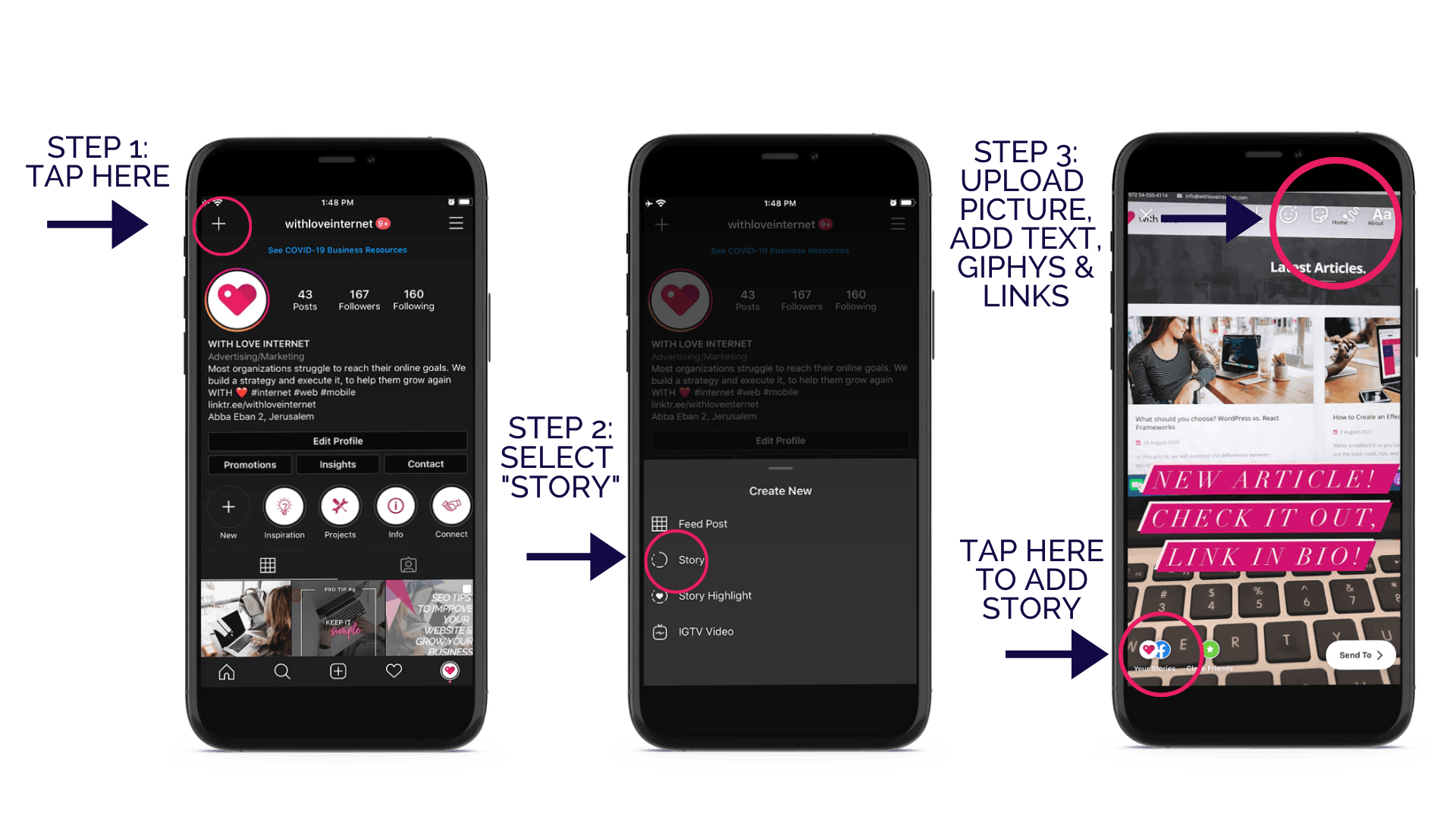
How to use Stories well
- Share your new posts with a short comment or question, so followers who missed them in their feed can catch up.
- Use interactive stickers like polls, questions and quizzes to get your audience talking.
- Add links with the link sticker to send people to your website, product page or latest video.
- Go behind the scenes. Stories are a more casual, personal space, so show the people and process behind your brand.
- Save your best Stories to Highlights so they stay on your profile after 24 hours. Give each Highlight a clear title and cover.
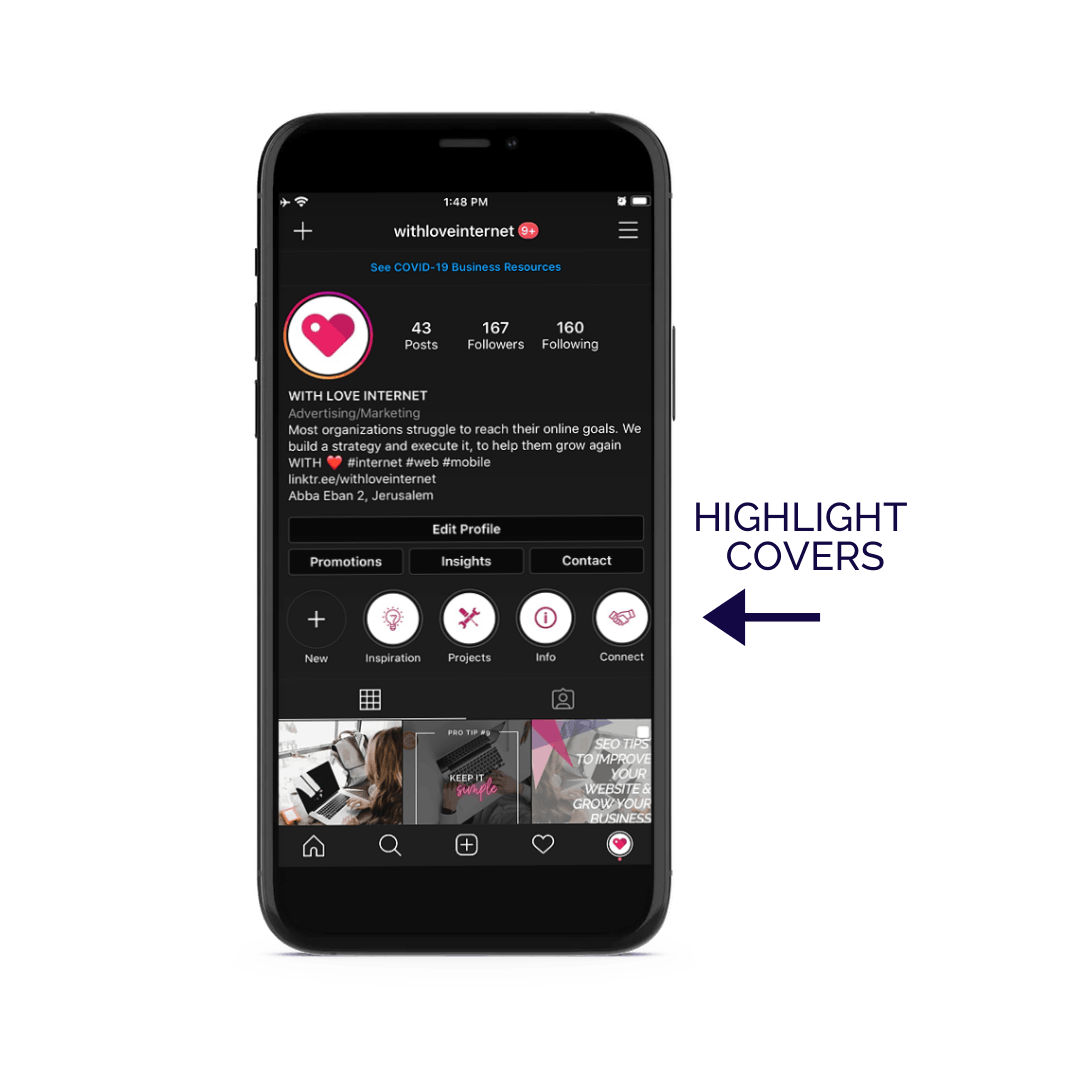
3 common Stories mistakes
- Tiny text: make sure people can read it on a phone without squinting.
- Too much text: get to the point. Nobody wants to read an essay in a Story.
- Broken links: always preview your link before you post. It takes two seconds.
Step 3: Execute
Here’s where the rubber meets the road. A great plan only works if you show up consistently.
Build a posting schedule
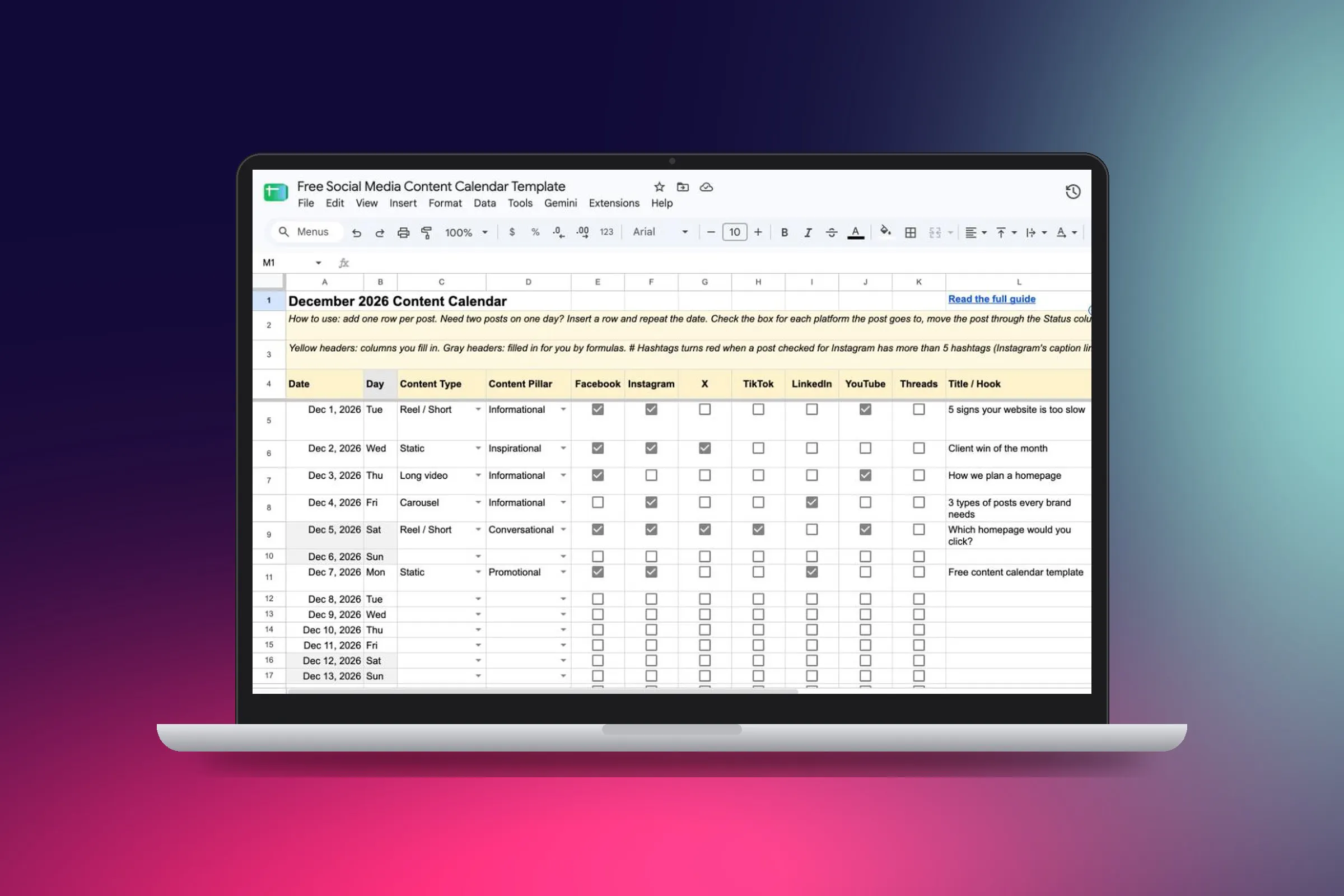
Map out your posts in a calendar with the date, platform, caption, links, hashtags and content type. It keeps you consistent and helps you plan ahead for holidays, launches and sales. Our social media schedule template is a good place to start.

Not every schedule should follow the algorithm, though. If your business hosts a weekly show or event, sync your posts with it.
Use the right tools
- Scheduling: a tool like Metricool, Buffer or Later lets you plan and publish everything from one place. We use Metricool for our clients today, and we compare the options in Buffer vs Later.
- Project management: a shared board keeps your team, approvals and deadlines on track. We use ClickUp, and we explain why in Monday vs Basecamp.
- Tracking links: add UTM tags to every link so you can see exactly which posts send traffic and sales.
Use hashtags (a few, not a wall)
Hashtags still help people discover your content, but less is more. Instagram now limits posts and Reels to five hashtags. Pick the most relevant ones for each post, and test them over time.

Step 4: Improve
Congratulations, you made it this far! Before we pop the champagne, let’s look at the results.
The attitude to take is simple: what can we do better? We review results on three timelines:
- Daily: check how new posts are doing and watch for trends worth jumping on.
- Every two weeks: review the last 14 days with your team and decide what to post next.
- Monthly: create a social media monthly report to see the bigger picture and your growth over time.

The goal is to understand why your numbers go up or down. Skip this step, and you’ll keep posting the same things and wonder why your audience is walking out the door.
Pro tip: platforms change their features constantly. Keep your content fresh, test new formats early and don’t get left behind.

Now It’s Your Turn
Social media can feel overwhelming at first. It’s always changing, and so is your audience.
But if you follow the cycle (plan, create, execute, improve) and repeat it every month, you’ll build something that lasts.
You do your best, and the platforms will do the rest.
Want to put paid ads behind your best content? Our Meta Ads guide shows you how.
Social Media Strategy FAQ
It’s your plan for using social media to reach business goals: who you are, who you’re talking to, what you’ll post and when, and how you’ll measure results.
Let’s Build Your Social Media Strategy
Our social media team plans, creates and posts your content, then shows you what’s working every month.